I assume you already have a custom CSS file for your application? (in the directory
“C:\AwareIM\Tomcat\webapps\AwareIM\Custom\CSS” ).
Set a CSS class name for your query for which you want to change the cursor. You do this by opening the query, go to the query properties and set a name in the property “CSS Class”. See example screenshot below:
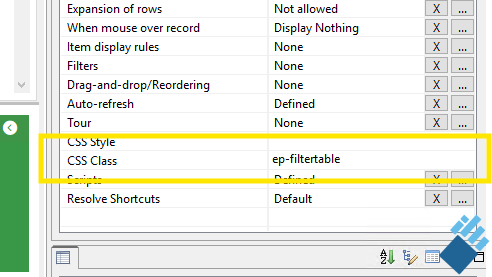
In my case, the class name is “ep-filtertable”, but you can choose any name that you want (provided that it is a valid class name of course) and does not conflict with other class names used on the same page. It’s good practice to start with the name of the application to make it distinct from other class names (for example, all class names used by Aware start with “aw-”; all classnames used by Kendo UI start with “k-”).
Then include the CSS rule mentioned in my previous post to your custom CSS file, where you replace “my-class” with the name of the CSS class that you defined in the query settings. So in my case the CSS is:
div.ep-filtertable tr.k-table-row.k-master-row:hover {cursor: pointer;}
You could also choose to use a more general classname, for example “show-pointer-cursor”. Note that the CSS will only apply to the queries where you defined the class name in the CSS Class property of the query. Using class names enables you to make very specific adjustments to individuel queries. If you really want to have a pointer cursor for ALL queries, that should be doable too but in that case the CSS rule would have to be amended. I would need to look into that, as I haven’t used it myself (I don’t want to have the pointer cursor as default), but it is certainly possible.
If for any reason a CSS rule doesn’t work as expected, you can try to find out why by using the Developer Tools of the browser. For example, in Firefox and Chrome the F12 key opens the Developer Tools. One of those tools is the functionality to see all CSS settings for a particular element on the screen, which of those are applied and why certain rules are not applied because they are overridden by another rule.