Documentation
Documentation
  • Themes
    • Themes
    • Default
    • Bootswatch Themes
    • Slate
  • Table of Contents
    • Table of Contents

  1. You are here
  2. Home
  3. docs
  4. Mobile Applications
  5. Displaying Google Maps

Sidebar
  • Introduction
  • Quick Tour
  • Installation Guide
  • Getting Started
  • AwareIM Concepts
  • Configuring Applications
  • Rule Language
  • Actions And Functions
  • Mobile Applications
    • Introduction
    • General Approach
    • Login
    • Using Visual Perspectives
    • Using Queries
    • Using Forms of Business Objects
    • Display & Upload Images from Camera and/or Photo Library
    • Sending Push Notifications to Mobile Phones
    • Getting Location of the Current User
    • Displaying Google Maps
    • Embedding Video
    • Using Processes
    • Building native mobile applications
  • How To...
  • Programmer's Reference
  • AI Integration
  • Videos
  • Case Study
  • Glossary
  • Appendices
  • Changelog
  • Show pagesource
  • Old revisions
  • Backlinks
  • Export to PDF
  • Back to top
Manuals, Mobile Applications

Displaying Google Maps

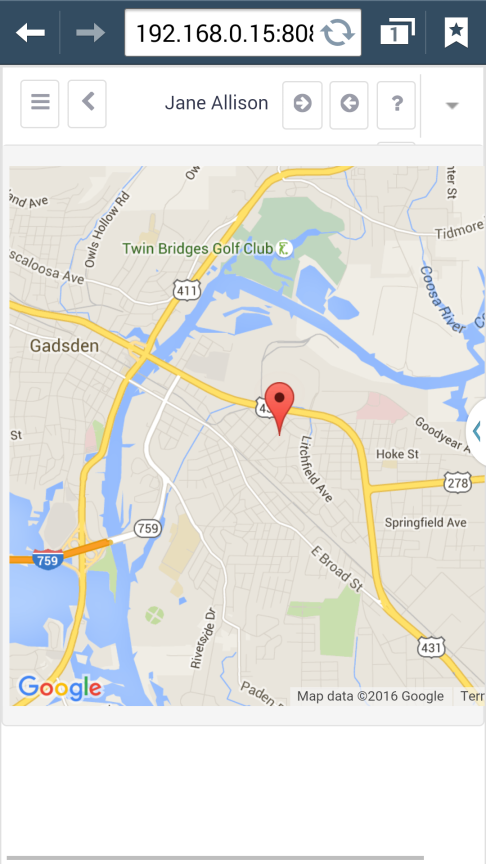
This is no different from displaying Google Maps in desktop applications – you can embed Google Maps into object forms, object presentations or display standalone Google Maps as part of the static HTML for a content panel of a visual perspective. See the using forms with Google maps for more details.

Using Google Maps in AwareIM.
 

manuals mobile applications
Log In