Documentation
Documentation
  • Themes
    • Themes
    • Default
    • Bootswatch Themes
    • Slate
  • Table of Contents
    • Table of Contents

  1. You are here
  2. Home
  3. docs
  4. Configuring Applications
  5. Adding/Editing Visual Perspectives
  6. Working with Visual Perspective Editor
  7. Defining Layout of Content Panels
  8. Accordion Layout

Sidebar
  • Introduction
  • Quick Tour
  • Installation Guide
  • Getting Started
  • AwareIM Concepts
  • Configuring Applications
    • Overview of the Configuration Tool
    • Working with Business Space Versions
    • Working with Configuration Elements
    • Finding where Element is Used
    • Adding/Editing Business Objects
    • Adding/Editing Attributes
    • Adding/Editing Rules
    • Adding/Editing Processes
    • Adding/Editing Business Object Groups
    • Adding/Editing Queries
    • Adding/Editing Notifications
    • Adding/Editing Document Templates
    • Adding/Editing Access Levels
    • Adding/Editing Visual Perspectives
      • Working with Visual Perspective Editor
        • Defining Frame Properties
        • Defining Tab Properties
        • Defining Content Panel Properties
        • Defining Content Panel with HTML Content
        • Using Tiles in Dashboards
        • Defining Layout of Content Panels
          • Responsive Grid (Simple) Layout
          • Responsive Grid (Nested) Layout
          • Vertical Anchor Layout
          • Vertical Box Layout
          • Horizontal Layout
          • Column Layout
          • Table Layout
          • Border Layout
          • Accordion Layout
          • Setting Menu Properties
          • Setting Menu Item Properties
    • Multi-step Processes
    • Adding/Editing Worksheets
    • Form and Grid Styles
    • Creating Applications in Different Languages
    • Right-to-left Support
    • Adding/Editing Services
    • Scheduling
    • Adding/Editing Business Spaces
    • Working with Data Stored in Existing Database Tables or LDAP
    • Handling Login Events
    • Handling Logout Events
    • Email Handling
    • Adding Appointment Objects
    • Login via social media sites and other applications
    • Implementing Single Sign-on using SAML protocol
    • Generating Documentation
    • View Configuration Tool Settings
    • Show System Objects
    • Searching for Elements in a Business Space Version
    • Backing up and Restoring Operational Data
    • Data Migration
    • Managing Configuration Users
    • Working on the Same Business Space Version Concurrently (Multi-Developer Mode)
    • Protecting Business Space Version
    • Comparing Business Space Versions
    • Logging into the Operation Mode
    • Re-connecting to the AwareIM Server
    • Undoing and Redoing Changes
    • Working with Report/Presentation Designer
    • Building Runtime Executable
    • Configuring Applications for Mobile Devices
    • Creating Native Mobile Applications
    • Determining Current Location of the User
  • Rule Language
  • Actions And Functions
  • Mobile Applications
  • How To...
  • Programmer's Reference
  • AI Integration
  • Videos
  • Case Study
  • Glossary
  • Appendices
  • Changelog
  • Show pagesource
  • Old revisions
  • Backlinks
  • Export to PDF
  • Back to top

Accordion Layout

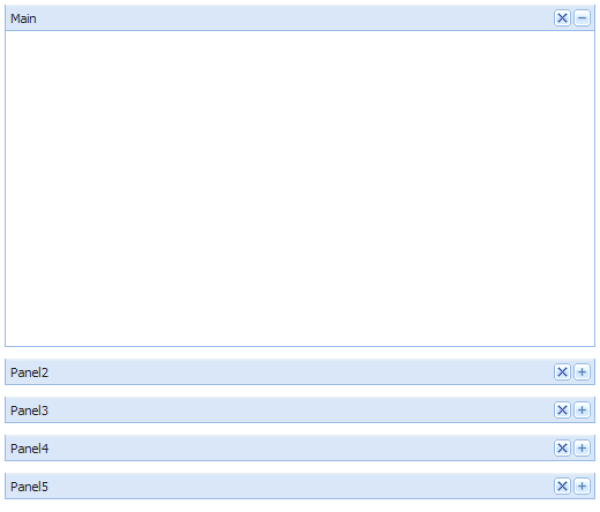
The Accordion layout is shown on the picture below:

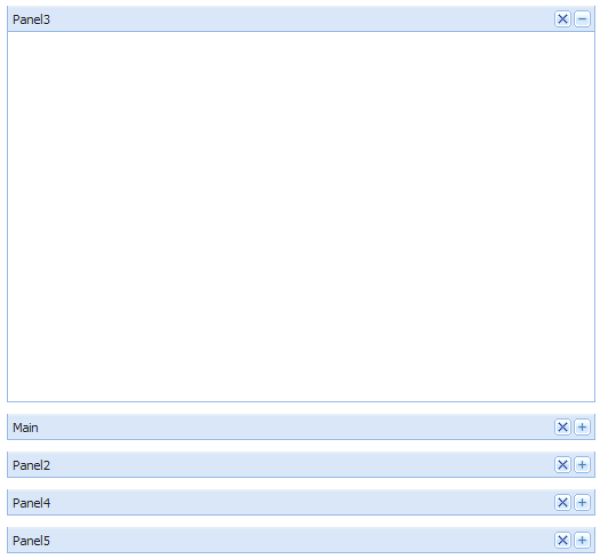
Only one panel is active at a time, other panels are collapsed. When the user clicks on the “plus” icon to expand another panel it becomes active and is placed on top (see below):

Log In